
Waves
Settings → Waves. A wave is one round of trips, usually one meal. What waves are and why they matter is explained in Waves and trips. Dispatchers and admins can change them.
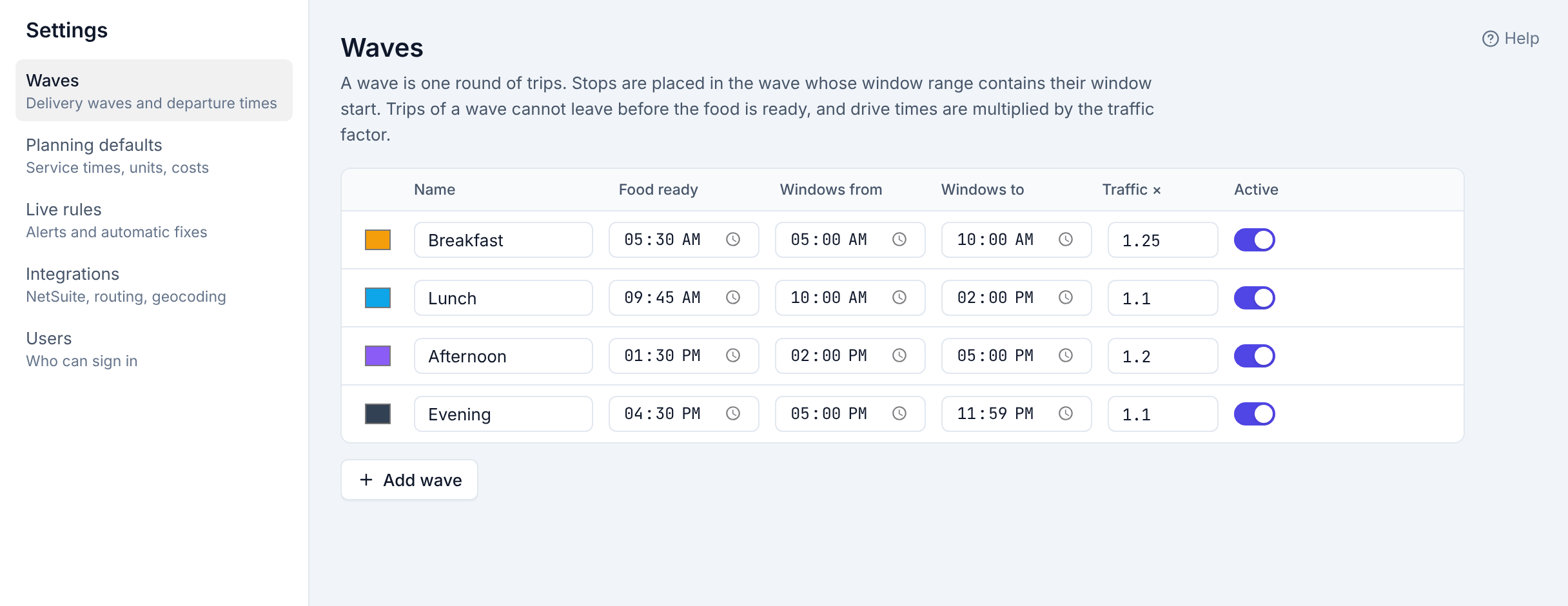
| Column | What it does |
|---|---|
| Colour, Name | How the wave appears on the board. |
| Food ready | No trip of this wave leaves the kitchen earlier. Set it to when the kitchen has that meal packed. |
| Windows from, Windows to | A stop goes into this wave when its window starts in this range (from included, to excluded). The ranges should not overlap. |
| Traffic × | Multiplies drive times in this wave: 1.25 plans a 20-minute drive as 25 minutes. Between 0.5 and 3. |
| Active | Optimize uses only active waves. |
After changing a row, click the Save button that appears at its end. Changes apply to the next Optimize; trips already built keep their times until they are re-planned.
Add wave adds a row (named New wave, 12:00–1:00 PM) to fill in.
Getting the traffic factor right
Start with the defaults (Breakfast 1.25, Lunch 1.10, Afternoon 1.20, Evening 1.10). After a few weeks, open Reports → Calibration: it compares real drive times with the plan and suggests a factor per wave, which you can apply from there with one click.